Turn Repetitive Processes Into Connected Workflows.
Automate approvals, notifications, reminders and business processes across the systems your organization relies on.
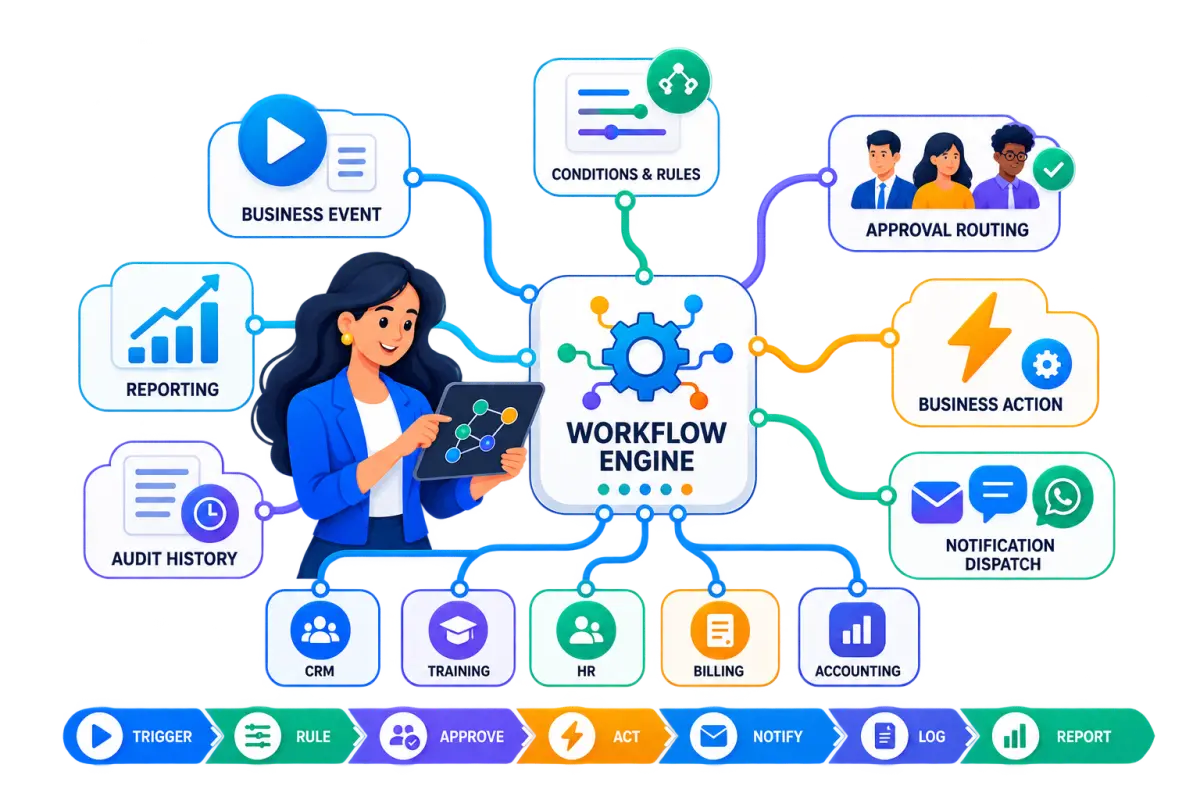
Eight Pillars of Connected Workflow Automation
Eliminate manual follow-up friction with event triggers, multi-tier approvals, scheduled batch tasks, and cross-department process synchronization.
Too Many Business Processes Still Depend on Manual Follow-Up
When core business operations rely on spreadsheets, informal chat messages, and manual follow-up, organizations suffer operational delays, lost visibility, and administrative overhead.
Approvals Lost in Email and Chat
Important purchase, leave, and sales discounts get delayed or lost in cluttered email threads and informal chat groups without formal tracking.
Manual Reminder Overhead
Staff members spend valuable working hours manually chasing colleagues, instructors, or customers for pending documents and payments.
Repetitive Manual Data Entry
Teams re-enter the same customer, student, or invoice data across multiple disconnected applications, multiplying human errors.
Disconnected Department Silos
Sales, finance, HR, and training operations work in isolation without automated handovers between successive lifecycle stages.
Records Do Not Trigger Actions
When a deal is won or a student completes training, the system fails to automatically prompt the next required operational step.
Manager Visibility Blindspots
Leadership lacks real-time insight into pending bottleneck requests, approval turnaround times, and operational SLA adherence.
High Administrative Coordination
Coordinating multi-step processes manually consumes leadership time that should be focused on strategic growth and service delivery.
Multi-Center Process Drift
Operating multiple branches or training centers without standardized workflow rules leads to inconsistent service quality and policies.
From Business Event to Completed Action
Rudram designs structured workflows that translate operational events into rule-evaluated actions, multi-tier approvals, customer notifications, and permanent audit logs.
Business Event
A user action, status change, date threshold, or form submission initiates the workflow.
Condition & Rules
The system evaluates business criteria such as amount thresholds, user roles, or category tags.
Workflow Engine
The workflow coordinates the execution path based on predefined organizational policies.
Approval Routing
Requests route to designated managers with approve, reject, or revision capabilities.
Business Action
The system creates records, generates documents, updates statuses, or posts ledger entries.
Notification Dispatch
Instant alerts and documents are dispatched via Email, SMS, or WhatsApp channels.
Activity History
Every action, approver signature, and timestamp is permanently recorded in the audit log.
Reporting & Telemetry
Managers monitor throughput, pending queues, and SLA turnaround metrics in real time.
Move Approvals From Manual Follow-Up to Structured Workflows
Transform disorganized email chains into structured, role-based approval queues with automatic escalation, contextual attachments, and transparent audit trails.
Sales & Quotation Approvals
Route special discount requests, non-standard payment terms, or custom proposals to sales directors before client release.
Purchase & Expense Approvals
Multi-tier approval chains for vendor purchase requisitions and employee expense claims based on department budgets.
HR & Leave Requests
Empower team leads to review and approve leave applications, attendance adjustments, and shift change requests.
Training & Batch Approvals
Review course capacity, instructor assignments, and prerequisite verifications before launching new training batches.
Certificate & Credential Sign-Off
Formal verification by lead examiners and academic directors before accredited digital certificates are finalized.
Financial Adjustments & Credit Notes
Authorize billing fee waivers, invoice cancellations, and credit note issuances with mandatory managerial approval.
Keep People Informed at the Right Step
Trigger automated, template-based alerts across email, SMS, and WhatsApp as key business events unfold across your systems.
Automated Email Dispatch
Deliver branded PDF invoices, enrollment confirmations, course schedules, and approval notices directly to mailboxes.
SMS Alerts & Reminders
Send time-sensitive SMS alerts for batch schedule changes, exam dates, and payment receipt acknowledgments.
WhatsApp Document Sharing
Share certificates, fee receipts, and training materials directly over official WhatsApp Business channels.
Configurable Event Triggers
Define exact conditions that trigger outgoing communication to specific recipients, roles, or customer groups.
Automate Time-Based Processes
Ensure time-sensitive milestones never slip through the cracks with scheduled cron-like background jobs, date-based reminders, and recurring workflow executions.
Due Date & Overdue Reminders
Automatically notify customers of upcoming invoice deadlines and escalate overdue balances to finance managers.
Recurring Operational Tasks
Generate recurring monthly invoices, periodic asset maintenance alerts, and scheduled system health checks.
Milestone & Expiry Alerts
Notify trainees and corporate sponsors well before certification validity expires or course access periods end.
Automated Status Registers
Compile daily batch attendance summaries, pending approval digests, and cash collection logs for executive review.
Connect Workflows Across Your Business Systems
Break down software silos by connecting CRM sales conversations, HR workforce operations, training delivery, accounting ledgers, and communication desks into unified operational pipelines.
CRM to Billing & Operations
When a sales deal is won in CRM, automatically generate a draft invoice, create student enrollment records, and notify instructors.
HR to Payroll & Accounting
Approved employee attendance logs and expense reimbursements flow directly into monthly payroll processing and general ledgers.
Training Lifecycle to Certification
Passing examination grades trigger certificate generation workflows, template population, director approval, and delivery.
Unified Communication Hub
Keep customer emails, SMS logs, and WhatsApp conversation history accessible across all modules from a single interface.
Automate Customer and Sales Workflows
Streamline lead capture, qualification stages, customer activity logging, deal conversion, and post-sales handovers without manual re-keying.
Lead Capture & Assignment Rules
Automatically route inbound web inquiries and course applications to designated sales counselors based on branch or program.
Activity Logging & Follow-Up Tasks
Schedule automated follow-up tasks, call reminders, and email sequences when sales opportunities advance through pipeline stages.
Deal Won to Invoicing Handover
Instantly convert approved commercial proposals into customer accounts and draft invoices without manual data copying.
Feedback & Support Workflows
Trigger automated post-training satisfaction surveys and support ticket assignments upon course completion.
Connect Financial Processes With Business Events
Bridge commercial transactions with double-entry accounting ledgers, expense authorizations, invoice dispatches, and aging receivables reminders.
Quote-to-Invoice Generation
Automatically generate tax invoices with pre-calculated rates, discounts, and payment terms upon sales order confirmation.
Payment Receipt to Ledger Posting
Posting a payment receipt automatically reconciles customer balances and creates double-entry journal vouchers in the general ledger.
Purchase Requisition Approvals
Route vendor purchase requests through department budget verifications and manager authorization chains.
Aged Receivables Escalations
Trigger staged reminders for invoices exceeding 30, 60, or 90 days with automated escalation alerts to account executives.
Bring HR Processes Into Structured Workflows
Turn employee onboarding, leave requests, attendance logs, and monthly payroll verifications into predictable, rule-governed workflows.
Employee Onboarding Checklists
Guide new hires through structured documentation collection, asset assignments, and role permission provisioning.
Multi-Tier Leave & Shift Approvals
Automate employee leave requests with balance deductions, manager approval routing, and team calendar sync.
Monthly Payroll Verification
Consolidate shift attendance, approved allowances, and deduction adjustments into structured monthly payroll approval batches.
Role & Permission Lifecycle
Synchronize employee system access permissions with departmental transfers, promotions, and exit procedures.
Automate the Training Lifecycle
From initial course inquiry and student registration to batch scheduling, attendance logging, exam evaluations, and certificate issuance — connect every stage with VheTM.
Inquiry & Trainee Registration
Capture candidate profiles, verify course prerequisites, and record enrollment agreements.
Batch Scheduling & Capacity
Allocate classroom venues, assign certified trainers, and monitor enrollment seat thresholds.
Attendance & Exam Evaluation
Log daily session attendance, track trainee progress, and record examination marks.
Certificate & Verification
Generate accredited digital certificates with unique serial numbers and director approvals.
Control Approval-Driven Certificate Processes
Maintain accredited training integrity with multi-stage verification workflows, serial numbering generation, examiner sign-offs, and secure digital credential dispatch.
Course Completion Validation
System automatically verifies that required attendance thresholds and exam passing criteria have been satisfied.
Examiner & Director Sign-Off
Route pending certificate batches to authorized examiners and academic directors for formal digital sign-off.
Unique Serial Numbering
Generate audit-compliant, non-repeating certificate serial numbers mapped to designated course templates.
Validity & Expiry Monitoring
Track certificate validity periods and trigger automated renewal notifications prior to credential expiration.
Connect Business Workflows With WhatsApp
Integrate official WhatsApp Business communication directly into ERP workflows with dynamic variable templates, multi-agent desks, and contextual chat histories.
WhatsApp Agent Desk
Manage multi-agent live chat desks with team member routing, handover capabilities, and internal staff notes.
1-Click Dynamic Messages
Dispatch personalized messages with dynamic student names, batch dates, invoice links, and fee balances directly from ERP records.
ERP Record Linking
Every inbound and outbound WhatsApp conversation is permanently attached to the relevant customer, lead, or trainee record.
Rich Media Document Sharing
Send PDF certificates, invoices, course brochures, and receipts seamlessly within official WhatsApp service windows.
Keep Communication Connected to Business Context
Every email, SMS, and WhatsApp message stays linked directly to the parent customer record, student profile, or invoice voucher for permanent operational traceability.
Context-Rich Messaging
Staff view complete communication histories alongside commercial contracts, course enrollments, and payment ledgers.
Standardized Templates
Ensure professional brand consistency by providing staff with pre-approved message templates across all channels.
Multi-Channel Options
Deliver communications via the channel preferred by the client — Email for formal records, WhatsApp for fast engagement.
Dispatch Audit Logs
Maintain complete timestamped records of sent messages, recipient identifiers, and delivery timestamps.
Know What Happened and Who Acted
Gain operational accountability with timestamped activity logs, user action tracking, and status modification histories across every business entity.
Timestamped Action Logs
Record the exact date, time, and system user responsible for every state change, approval, or data modification.
User Identity & Role Tagging
Ensure all actions reflect the authenticated user credentials and organizational role of the executing staff member.
Record State Transition History
View complete chronological audit trails showing previous values, new values, and associated managerial comments.
Operational Transparency
Eliminate departmental finger-pointing by maintaining clear visibility into task handovers and approval timelines.
Give Every Workflow the Right Access Rules
Enforce granular role-based access control (RBAC) ensuring only authorized personnel can initiate, review, approve, or override workflow steps.
Granular Role Governance
Define precise permissions for sales counselors, instructors, branch accountants, and executive directors.
Center & Entity Scoping
Restrict branch personnel to workflows and records belonging to their assigned operating location.
Multi-Tier Escalation Paths
Automatically escalate unapproved requests to higher authority levels when designated SLA thresholds expire.
Separation of Duties
Enforce internal control principles by ensuring requisition creators cannot approve their own financial requests.
Standardize Processes Across Multiple Centers
Enforce uniform operational standards across distributed branches and regional training centers while allowing localized execution and central executive oversight.
Branch-Scoped Execution
Staff at each center manage their local students, course schedules, and billing series independently without interference.
Centralized Policy Governance
Headquarters defines standard pricing rules, discount ceilings, and approval matrices enforced system-wide.
Consolidated Telemetry
Leadership monitors pending approval counts, batch enrollments, and turnaround SLAs across all branches on one dashboard.
Consistent Service Quality
Ensure trainees and corporate clients receive the exact same high-quality operational experience across all locations.
Have a Process That Doesn't Fit Standard Software?
Every organization operates with unique business rules. Rudram specializes in analyzing, designing, and engineering bespoke software workflows tailored to your exact operational model.
Operational Analysis
We examine your current procedures, handover bottlenecks, approval hierarchies, and integration requirements.
Workflow Architecture
We map out custom state transitions, conditional logic rules, notification triggers, and user access matrices.
Custom Engineering
Our team builds the bespoke business logic, database structures, UI queues, and communication connectors.
Systems Integration
We connect the new workflows with your existing ERP, CRM, accounting databases, or legacy software tools.
Testing & Go-Live
End-to-end edge case verification, staff role training, user documentation, and dedicated post-launch support.
Ready to Design Your Custom Workflow?
Consult with our senior workflow architects to evaluate your existing procedures and design a structured, automated system.
Discuss Your WorkflowBuild Automation Into Your ERP — Not Around It
Avoid brittle third-party automation patches. Rudram builds custom workflows directly into the core ERP and database layer for maximum stability, performance, and data integrity.
Core Database Integrity
Workflows execute directly with transactional ACID guarantees, eliminating syncing failures and broken webhooks.
Zero Third-Party Fragility
No reliance on external middleware or per-task automation billing that balloons software costs as operations grow.
Real-Time Cross-Module Sync
Actions in one module instantly reflect across general ledgers, student profiles, and CRM timelines without polling delays.
Tailored to Your ERP Logic
Customized to your specific data models, numbering series, accounting codes, and operational reporting registers.
See Where Workflows Stand
Monitor operational throughput, identify process bottlenecks, track overdue approval queues, and evaluate departmental response times with live workflow telemetry.
Workflow Status & Queue Registers
Live dashboards showing active, pending, approved, and completed workflows across departments.
- Pending Approval Count
- Active Batch Workflows
- Completed Inquiries
- Failed Action Logs
Approval SLA & Turnaround Reports
Track average response times for managerial approvals and highlight workflow bottlenecks.
- Average Approval Time
- Overdue Approval Alerts
- Manager SLA Adherence
- Escalated Requests
User Activity & Execution Logs
Detailed logs of automated tasks executed, manual overrides, and staff interaction histories.
- Daily Task Executions
- User Action History
- Role Override Log
- System Event Digest
Operational Exception Telemetry
Real-time detection of failed notification dispatches, missing prerequisites, or blocked workflows.
- Failed SMS/Email Logs
- Unassigned Requests
- Prerequisite Blockers
- Resolution Timelines
Who This Solution Is For
Designed for organizations that want to eliminate manual follow-ups and connect their business processes through structured software workflows.
Education Organizations
Universities and colleges requiring structured admissions counseling, student registration, fee tracking, and academic workflows.
Training Providers
Commercial academies needing seamless course scheduling, trainee attendance, exam verification, and certificate approvals.
Multi-Center Organizations
Distributed enterprises operating multiple branches that need standardized business policies and centralized oversight.
Growing Businesses
Companies experiencing growing pains where manual coordination between sales, HR, and accounting is slowing operations.
Organizations With Existing ERP
Enterprises that have established software but need custom workflow bridges, approval queues, and WhatsApp integrations.
Complex Process Businesses
Organizations with unique contractual terms, non-standard pricing logic, or multi-department approval requirements.
Why Build Your Workflows With Rudram?
We bring deep enterprise ERP expertise, custom engineering capabilities, and long-term architectural stability to your workflow operations.
Education & Training Domain Expertise
Years of experience engineering mission-critical training management and education systems for leading academies.
Full-Scale ERP Engineering
We design and develop complete business systems across CRM, accounting, billing, payroll, and training operations.
Custom Software Development
We build software around your organization’s real business rules rather than forcing you into rigid templates.
Connected Workflow Philosophy
We eliminate software silos by ensuring data moves seamlessly between departments with full auditability.
Enterprise Security & RBAC Governance
Granular permissions, multi-entity isolation, and complete modification history built into every workflow layer.
Dedicated Engineering Partnership
We work directly with your leadership and operational teams from architecture design to deployment and ongoing support.
Workflow & Automation FAQs
Find answers to common questions about our business workflow automation solutions, approval routing, multi-channel notifications, and custom ERP integration.
What is business workflow automation?
Business workflow automation is the practice of designing software rules that automatically guide multi-step business procedures — such as lead handovers, purchase approvals, student registrations, or invoice dispatches — through predefined stages, approvals, notifications, and ledger postings without relying on manual follow-up.
Can Rudram automate approval workflows?
Yes. Rudram can design multi-tier approval workflows tailored to your organizational hierarchy for sales discounts, purchase orders, leave requests, course schedule changes, and certificate issuance with automated manager notifications and status tracking.
Can workflows send notifications across different channels?
Yes. Configured communication channels (including Email, SMS, and WhatsApp) can be connected to relevant workflow events to send branded documents, payment receipts, due date reminders, and status updates.
Can Rudram connect workflows across CRM and accounting?
Yes. We build connected business architectures where a closed deal in CRM can automatically trigger sales orders, generate draft invoices, create customer ledger entries, and alert operations without manual data re-entry.
Can workflows integrate with WhatsApp?
Yes. Where supported, WhatsApp Business API integrations can be connected to ERP records to allow one-click dynamic message templates, rich media document sharing (such as invoices or certificates), and multi-agent customer desks.
Can workflow automation support multiple centers or branches?
Yes. Our architectures support multi-entity and multi-center organizations with branch-scoped user permissions, localized operational queues, and consolidated executive roll-up reporting.
Can Rudram build custom business workflows for unique processes?
Absolutely. As a custom software and ERP engineering company, Rudram specializes in analyzing non-standard business rules and developing tailored state machines, approval matrices, and automated triggers.
Can existing ERP or legacy systems be integrated?
Yes. We develop custom RESTful API bridges, database connectors, and webhook handlers to connect modern workflow modules with your existing enterprise systems and legacy databases.
Can training workflows be automated end-to-end?
Yes. We can design and connect the entire training lifecycle — from course inquiry, registration, and batch scheduling to attendance tracking, examination grading, certificate approvals, and student notifications.
Can workflow reports and telemetry dashboards be customized?
Yes. We build custom operational dashboards and reports that display pending approval counts, turnaround SLAs, user execution histories, and exception logs matching your management KPIs.
Turn Your Manual Processes Into Connected Workflows
Tell us how your teams work today. Rudram can help identify opportunities to connect approvals, notifications, business systems and operational processes through customized software.